

SyncThingy
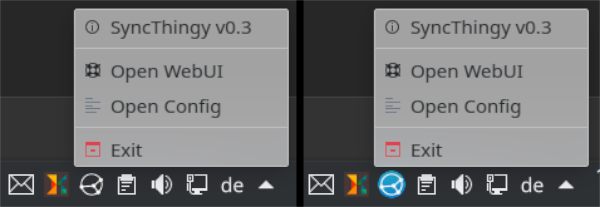
Read our comprehensive review of SyncThingy, a lightweight Linux tray indicator designed to help you easily monitor and manage your local Syncthing service.
Managing local file synchronization on Linux often requires keeping an eye on background services, and the SyncThingy Linux tray indicator offers an elegant, zero-fuss solution for this exact task. Developed by zocker_160, this lightweight utility is designed specifically for users who want to monitor their Syncthing status without keeping a heavy browser tab open or constantly running terminal queries. Built in C++, it adheres strictly to the Keep It Simple, Stupid (KISS) philosophy, providing just the essential controls you need to keep your data replication running smoothly.
Why Use the SyncThingy Linux Tray Indicator?
For Linux enthusiasts who rely on Syncthing for continuous file replication across devices, knowing whether the daemon is actively running is crucial. The SyncThingy Linux tray indicator sits quietly in your system tray, offering immediate visual feedback on the state of your synchronization engine. Instead of navigating complex menus, a quick glance at your panel tells you everything you need to know.
Key Features and Functionality
- Instant Status Visibility: Easily see if your background synchronization service is active, idle, or stopped directly from your system panel.
- One-Click Management: Quickly stop the Syncthing daemon or trigger its launch without opening a command-line interface.
- Direct WebUI Access: Open the default Syncthing web interface instantly from the tray menu to configure folders, manage devices, or view detailed transfer speeds.
- Ultra-Lightweight Footprint: Written in native C++, the utility consumes negligible system resources, making it perfect for both high-end workstations and resource-constrained environments.
Who is This Utility For?
This utility is an ideal addition to the workflow of Linux users who value minimalist desktop environments and native performance. If you frequently need to toggle your synchronization status to save battery power, or if you simply prefer a clean visual cue over terminal monitoring, this tool bridges the gap perfectly. It does not attempt to reinvent the wheel; instead, it acts as a streamlined companion to the existing Syncthing ecosystem.
Simplify Your Synchronization Workflow
By focusing purely on core indicator functions, this utility avoids unnecessary feature creep. It provides a reliable, native desktop integration that respects your system resources while keeping you in complete control of your data transfers.
To integrate this handy utility into your desktop setup, visit the official Flathub store page today to explore the installation options for your distribution.